
Screenshots


App details
- Updated
- 2024-12-02T08:35:17.3398628Z
- Requires
- Windows 10 version 18362.0 or higher
- Language
- English
- Developer
- FireCubeStudios
- Category
- Mobile
SoftPas in:
This product is also available in the following languages:
About DarkSky for BlueSky
Download DarkSky for BlueSky – BlueSky, Windows, social media, community, modern design, user experience, feed, profiles, posts, direct messaging, multi-account support, customizable feeds
Overview
DarkSky for BlueSky is a community-driven social media client designed specifically for Windows users seeking an enhanced experience on the BlueSky platform. The app aims to bridge the gap between the BlueSky ecosystem and desktop users by offering a modern, intuitive interface that aligns with Windows’ native design language. Its primary purpose is to allow users to explore feeds, manage profiles, view posts, and engage with content in a seamless and visually appealing environment. Designed for individuals who value both functionality and aesthetics, DarkSky targets BlueSky enthusiasts, content creators, and professionals managing multiple online identities. The developer, DarkSky, has positioned the app as a collaborative project, actively involving users in its evolution through platforms like Discord and GitHub. This open development model fosters transparency and encourages user input, making the app a dynamic tool in the growing BlueSky ecosystem. Although still in early development, DarkSky demonstrates strong potential as a reliable desktop companion for BlueSky. Real-world use cases include daily content consumption, cross-account management (future), and private communication (upcoming). Its presence underscores the growing demand for high-quality, platform-specific social tools beyond mobile devices.
Key Features & Functionality
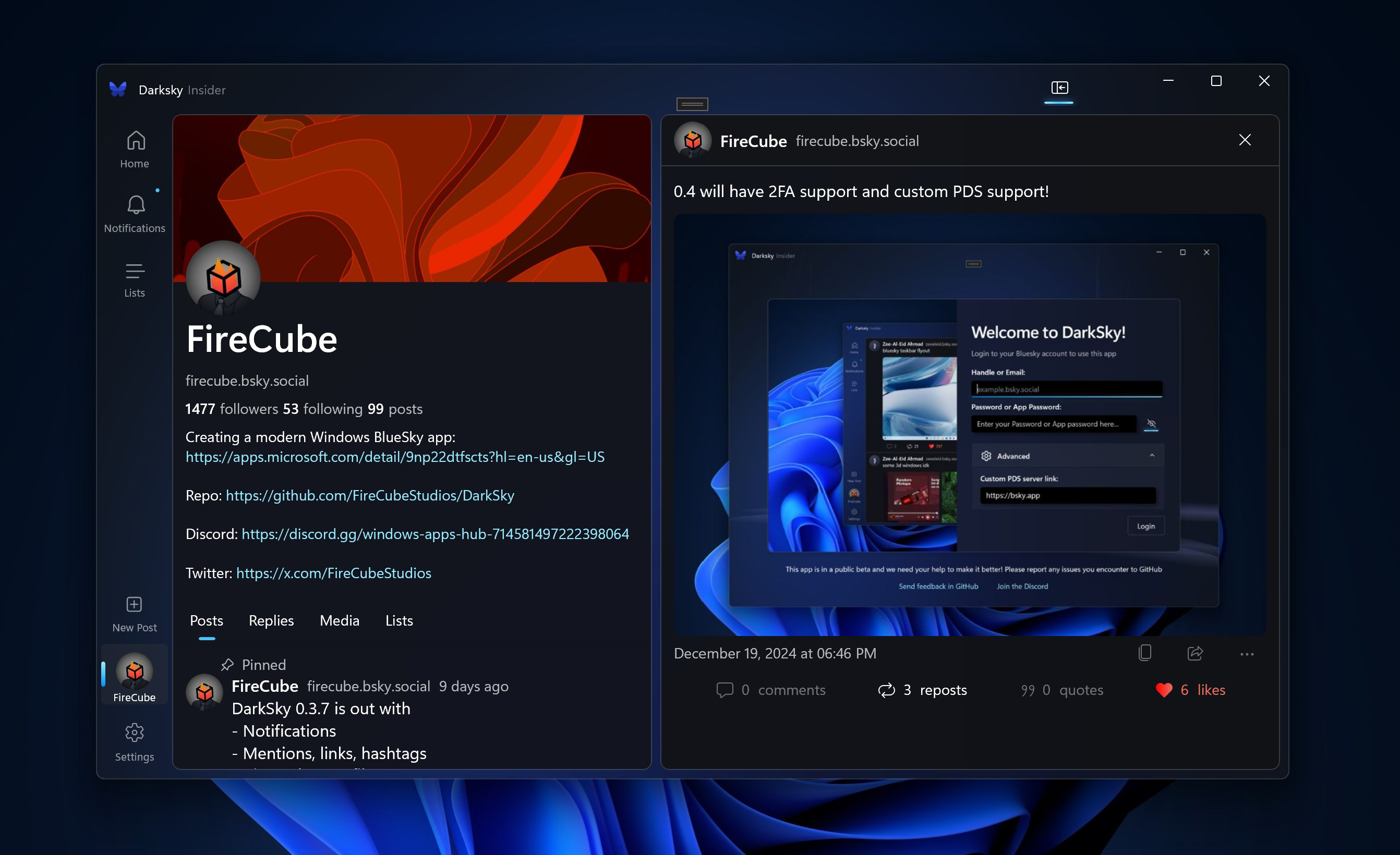
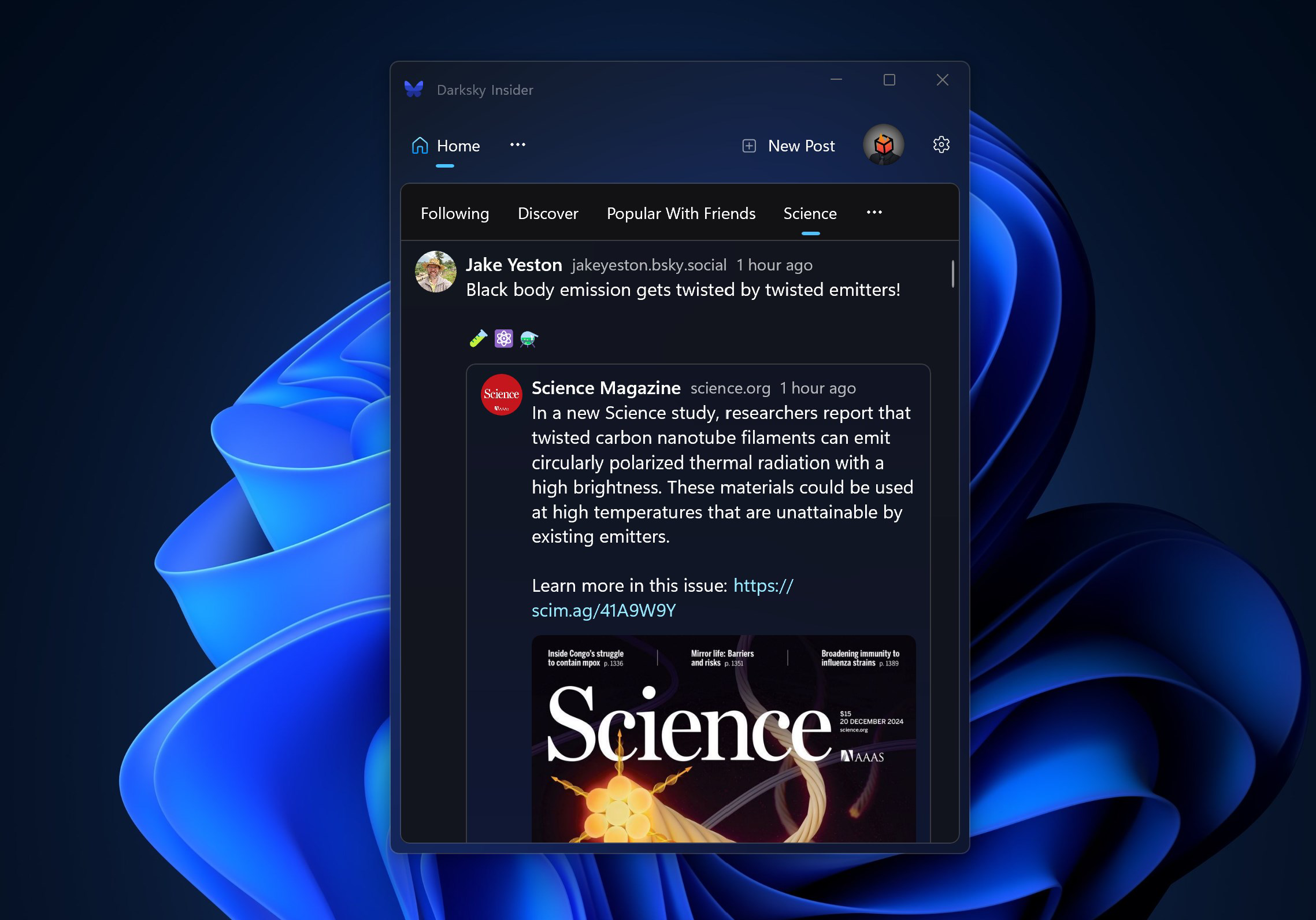
- Sleek Modern Design: The app features a contemporary UI tailored for Windows, with clean lines, intuitive layout, and responsive elements that enhance navigation and visual appeal. This design ensures a native-like experience on desktop systems.
- Community-Driven Development: DarkSky actively invites user feedback through Discord and GitHub, integrating suggestions and bug reports into regular updates. This collaborative approach ensures the app evolves in line with user needs.
- Multi-Account Support (Coming Soon): Future updates will allow users to manage multiple BlueSky accounts within a single interface, enabling quick switching between personal and professional profiles without re-authentication.
- Private Chat Features (Upcoming): Direct messaging functionality is under development, promising secure, private conversations with followers and friends, expanding the app’s social interaction capabilities.
- Customizable Feeds: Users will soon be able to tailor their content feeds by filtering posts, replies, and topics, allowing for a personalized and focused social media experience.
These features are designed to improve user engagement and content discovery. For example, a content creator managing both a personal and a brand account can benefit from multi-account support by switching between profiles instantly. Similarly, a user seeking a distraction-free feed can leverage customizable feed settings to prioritize specific topics or accounts. The inclusion of direct messaging will enable deeper connections within the BlueSky community, enhancing the app’s social utility. Although some features are not yet live, the roadmap indicates a strong commitment to long-term usability and feature completeness.
Interface, UX & Performance
DarkSky for BlueSky presents a clean, modern interface optimized for Windows, with a layout that prioritizes readability and ease of navigation. The visual style aligns with current desktop design trends, featuring consistent spacing, accessible typography, and a cohesive color scheme. Users can expect a logical flow when accessing profiles, feeds, and posts, with minimal friction in interaction. Navigation is streamlined through clearly labeled menus and intuitive gestures, reducing the learning curve for new users. Although the developer did not list formal performance metrics, the app’s lightweight size of 25.3 MB suggests efficient resource usage. The app is designed to function smoothly across various Windows device categories, including laptops and desktops, though specific performance benchmarks were not disclosed. Responsiveness is expected to be strong, given the focus on native integration. Stability appears to be a priority, with regular updates indicating ongoing maintenance. However, compatibility with older Windows versions was not specified. Overall, the UX emphasizes clarity and efficiency, making it suitable for both casual users and power users who value a polished desktop experience.
Platform Compatibility & Technical Requirements
DarkSky for BlueSky is designed exclusively for the Windows platform, making it accessible to users running desktop operating systems. The app is currently available in version 1.0.0, with a file size of 25.3 MB, indicating a lightweight footprint that should not strain system resources. The developer did not specify minimum OS requirements or hardware specifications, so users are advised to ensure their system meets general Windows compatibility standards. While no official support for macOS, Linux, or mobile platforms is mentioned, the app’s focus remains on Windows. As such, users on other operating systems will need to rely on alternative clients or web-based access. The absence of detailed technical requirements means that installation and operation may vary depending on individual system configurations. However, the app’s small size and dedicated platform focus suggest broad accessibility for most modern Windows machines.
Pros and Cons
Pros
- Modern, visually appealing interface tailored for Windows.
- Community-driven development with active user involvement.
- Lightweight size at just 25.3 MB.
- Free to download and use with no in-app purchases.
- Future features like multi-account support and private messaging are clearly planned.
Cons
- Some key features are not yet available and are marked as “coming soon.”
- Specific OS and hardware requirements were not listed.
- Compatibility with older Windows versions is unknown.
- No official support for mobile or non-Windows platforms.
- Performance on low-end systems has not been verified.
FAQ
Is DarkSky for BlueSky safe to download and use?
Yes, the app is free and distributed through official channels. As an open-source project, its code is available on GitHub, allowing users to review it for transparency and security.
Can I use DarkSky on my older Windows PC?
The developer did not specify minimum OS requirements. While the app’s small size suggests compatibility with most modern systems, performance on older hardware may vary.
Will DarkSky support Android or iOS in the future?
There is no information indicating plans for mobile platforms. The app is currently focused exclusively on Windows.
How often does DarkSky receive updates?
Regular updates are part of the development cycle, driven by community feedback and feature roadmaps. The app is actively maintained, with new versions released periodically.
Can I contribute to DarkSky’s development?
Yes. The project welcomes contributions through its GitHub repository and Discord community, where users can report issues, suggest features, or submit code.
Final Thoughts
DarkSky for BlueSky stands out as a promising desktop client for the BlueSky social network, offering a sleek, modern interface that feels native to Windows. Its community-first approach ensures that user needs shape its evolution, fostering trust and long-term engagement. While some features like multi-account management and private messaging are still in development, the foundation is strong and the roadmap is clear. For BlueSky users who prefer desktop access, this app delivers a streamlined, efficient experience. It’s particularly valuable for creators, professionals, and tech-savvy individuals who want more control over their social presence. With a free price model, lightweight design, and active development, DarkSky represents a smart choice for Windows users seeking a better BlueSky experience. Download DarkSky for BlueSky now.
Guides & Tutorials
How to install DarkSky for BlueSky
- Click the Download button above.
- Once redirected, accept the terms and click Install.
- Wait for the DarkSky for BlueSky download to finish on your device.
How to use DarkSky for BlueSky
This software is primarily used for its core features described above. Open the app after installation to explore its capabilities.
User Reviews
No reviews yet. Be the first to share your experience.
You may also like
more
Que no te pillen¡
About !Que no te pillen¡Reviewed by Jason A. BilbreyShow MoreShow Less

3D Combat Zone
About 3D Combat ZoneOriginally released in 1983, 3D Combat Zone immerses players...

666: El día del portal
About 666: El día del portalOn June 6, 2006, Agent P. Stone uncovers a sinister...

80 in 1 Best Flash games
About 80 in 1 Best Flash games 80 in 1 Best Flash games is a collection of 80 fl...

ABYSS SEEKERーーWhat Do You See Deep in The Abyss
About ABYSS SEEKERーーWhat Do You See Deep in The AbyssIn ABYSS SEEKER, players...

ACA NEOGEO THE KING OF FIGHTERS 2002 for Windows
About ACA NEOGEO THE KING OF FIGHTERS 2002 for WindowsTHE KING OF FIGHTERS 2002,...